Develop in a sandbox
You share a dev catalog with the rest of your team. You edit a flowgroup, run
it, and it writes dev_catalog.bronze.orders — the same table a teammate is
mid-run against. Now your two pipelines are fighting over one Delta table, and
whoever ran last wins.
You could give everyone their own catalog, or hand-rename every table in your
YAML before each private run and remember to change it all back. Or you turn on
sandbox mode: lhp generate --sandbox builds only your slice of the project
and renames the tables you produce into your own namespace, so you iterate in
isolation while every shared table your pipelines read stays exactly where it
is. Declare a namespace once; don’t hand-edit table names.
Let’s take the bronze_orders pipeline and generate a private copy for a
developer named alice, leaving the team’s shared tables untouched.
Before you begin
You need a Lakehouse Plumber project with at least one pipeline and a
substitutions/dev.yaml for the dev environment. This guide sandboxes
against dev. Deploying a sandbox uses the same Databricks bundle workflow as
any other build; see the deploy guide when you get there.
Sandbox mode follows one rule — read-shared, write-own. Only the tables your in-scope pipelines produce are renamed: the write itself and every in-scope read of it. Reads of tables produced outside your scope keep pointing at the shared tables, because those are inputs the whole team depends on.
Set the team policy
The rename policy is a one-time, team-level decision that lives in lhp.yaml
under a sandbox: block. The whole block is optional — when it is absent, the
defaults below apply — but stating it makes the policy explicit and lets you
fence sandbox mode to the environments where it is safe:
# Team-level sandbox policy. The whole block is optional; when it is absent the
# defaults below apply (strategy table, pattern {namespace}_{table}, any env).
sandbox:
  strategy: table                       # v1 supports only table (rename the leaf)
  table_pattern: "{namespace}_{table}"  # {namespace}/{table} are format placeholders, not ${tokens}
  allowed_envs:
    - dev
strategy: table renames the table leaf and passes catalog and schema
through unchanged. table_pattern is the str.format template applied to
that leaf — {namespace} and {table} are pattern placeholders, not
${...} substitution tokens, and both must appear. allowed_envs lists the
environments where --sandbox is permitted; running it against any other
environment fails with LHP-CFG-065. Omit the key to allow every environment.
Declare your sandbox profile
Your namespace and the pipelines you own live in a personal profile at
.lhp/profile.yaml. The .lhp/ directory is gitignored by the standard
project template, so this file never reaches version control — every developer
keeps their own. Sandbox is explicit opt-in: nothing is auto-detected.
sandbox:
  namespace: alice
  pipelines:
    - bronze_*        # glob: every pipeline whose name starts with bronze_
namespace must match ^[a-z][a-z0-9_]{0,63}$ — a lowercase letter, then
lowercase letters, digits, or underscores, 64 characters at most. pipelines
is a non-empty list of exact pipeline names or case-sensitive globs; an entry
containing *, ?, or [ is treated as a glob. Here bronze_* scopes
alice to the bronze_orders pipeline and any other bronze_ pipeline,
while the team’s downstream silver_orders pipeline stays out of scope.
Generate your slice
A shared run builds every pipeline in the project. Validate and generate without
--sandbox and all three flowgroups compile, plus the monitoring phase:
$ lhp generate --env dev
✓ discover (0.01s)
✓ preflight (0.00s)
✓ bronze_orders  2 files
✓ silver_orders  1 file
✓ generate (0.40s)
✓ format (0.05s)
✓ monitoring (0.00s)
2 pipelines generated · 3 files · 0.5s
Now add --sandbox. The run scopes to your profile: only bronze_orders
compiles, silver_orders is skipped, and the monitoring phase is skipped so a
sandbox build never overwrites the team’s shared monitoring artifacts.
$ lhp validate --env dev --sandbox
✓ discover (0.01s)
✓ preflight (0.00s)
✓ bronze_orders  0 files
✓ validate (0.36s)
1 validated · 0.4s

$ lhp generate --env dev --sandbox
✓ discover (0.01s)
✓ preflight (0.00s)
✓ bronze_orders  2 files
✓ generate (0.38s)
✓ format (0.05s)
1 pipeline generated · 2 files · 0.4s
validate --sandbox applies the renames and checks the scoped pipelines
before you commit to generating; generate --sandbox writes the Python.
Note
Sandbox scope comes from your profile, so --sandbox cannot be combined
with -p/--pipeline — passing both is a usage error (exit code 2). If
there is no .lhp/profile.yaml, the run fails with LHP-IO-025.
Read what changed
Open generated/dev/bronze_orders/orders_enriched.py. A shared run and a
sandbox run both write to generated/dev/ — this is the sandbox run:
# Generated by LakehousePlumber
# Pipeline: bronze_orders
# FlowGroup: orders_enriched

from pyspark import pipelines as dp

# Pipeline Configuration
PIPELINE_ID = "bronze_orders"
FLOWGROUP_ID = "orders_enriched"


# ============================================================================
# SOURCE VIEWS
# ============================================================================


@dp.temporary_view()
def v_orders():
    """Delta source: dev_catalog.bronze.alice_orders"""
    df = spark.readStream.table("dev_catalog.bronze.alice_orders")

    return df


# ============================================================================
# TRANSFORMATION VIEWS
# ============================================================================


@dp.temporary_view(comment="SQL transform: enrich_orders")
def v_orders_enriched():
    """SQL transform: enrich_orders"""
    df = spark.sql("""SELECT
  o.*,
  c.customer_name,
  c.region
FROM stream(v_orders) o
LEFT JOIN dev_catalog.raw.customers c
  ON o.customer_id = c.customer_id""")

    return df


# ============================================================================
# TARGET TABLES
# ============================================================================

# Create the streaming table
dp.create_streaming_table(
    name="dev_catalog.bronze.alice_orders_enriched",
    comment="Streaming table: alice_orders_enriched",
)


# Define append flow(s)
@dp.append_flow(
    target="dev_catalog.bronze.alice_orders_enriched",
    name="f_orders_enriched",
    comment="Append flow to dev_catalog.bronze.alice_orders_enriched",
)
def f_orders_enriched():
    """Append flow to dev_catalog.bronze.alice_orders_enriched"""
    # Streaming flow
    df = spark.readStream.table("v_orders_enriched")

    return df
Three things happened, and one deliberately did not:
The read of the bronze
orderstable (line 20) is nowspark.readStream.table("dev_catalog.bronze.alice_orders"). Your scope includes theorders_ingestflowgroup that producesorders, so that table is yours — and every in-scope read of it is renamed too.The write target (line 50) became
dev_catalog.bronze.alice_orders_enriched— thecreate_streaming_tablename and theappend_flowtarget both carry your namespace.The join against
dev_catalog.raw.customers(line 38) is unchanged. Your scope does not produce that table, so the sandbox leaves the read pointed at the shared dimension the other team owns.
Only the leaf name changes — dev_catalog.bronze is intact; orders became
alice_orders through the {namespace}_{table} pattern.
What you just did
A shared run wrote three flowgroups across two pipelines and refreshed
monitoring. Your sandbox run wrote exactly the two flowgroups you own, and every
table those flowgroups produce — orders and orders_enriched — is now
namespaced alice_orders and alice_orders_enriched at every read and write
site. The one shared table you read, raw.customers, was left untouched, and
the team’s silver_orders pipeline was never touched at all.
You changed no YAML to get here. You declared a namespace and a scope once, and
LHP rewrote the table identities for this run — so you can deploy and iterate on
the shared dev environment without ever writing over a table a teammate
depends on.
Deploy, iterate, clean up
Deploy a sandbox build with the regular Databricks bundle workflow, targeting your own development target:
$ databricks bundle deploy --target dev
Iterate by editing your YAML and re-running lhp generate --env dev --sandbox.
Every generate is a full regenerate, so to return to shared names you
regenerate without --sandbox — no sandbox names survive. When you are done,
tear the sandbox resources down:
$ databricks bundle destroy --target dev
Important
bundle destroy removes the sandbox streaming tables and materialized
views, but Delta-sink tables created by sandbox runs are not removed. Drop
those manually.
Sandbox mode in the web IDE
Everything above runs sandbox mode from the command line. If you work in the
visual workspace instead — see Develop in the local web IDE — you don’t drop back to the
terminal to get the same isolation. The lhp web header carries a Sandbox
toggle, labelled “Developer-sandbox mode — generate only your pipelines”, with
an info button beside it that says the same thing.
Turn it on and every Validate and Generate you trigger from the IDE behaves
exactly like --sandbox: the run scopes to the pipelines in your
.lhp/profile.yaml, and the tables your in-scope flowgroups produce are
renamed into your namespace. The toggle is the visual equivalent of the CLI
flag — it reads the same sandbox: block in lhp.yaml (the Set the team
policy section above) and the same .lhp/profile.yaml (the Declare your
sandbox profile section). There is no second place to configure it, and no
opt-in beyond the switch. If there is no profile, an IDE sandbox run fails the
same way the CLI does, with LHP-IO-025.
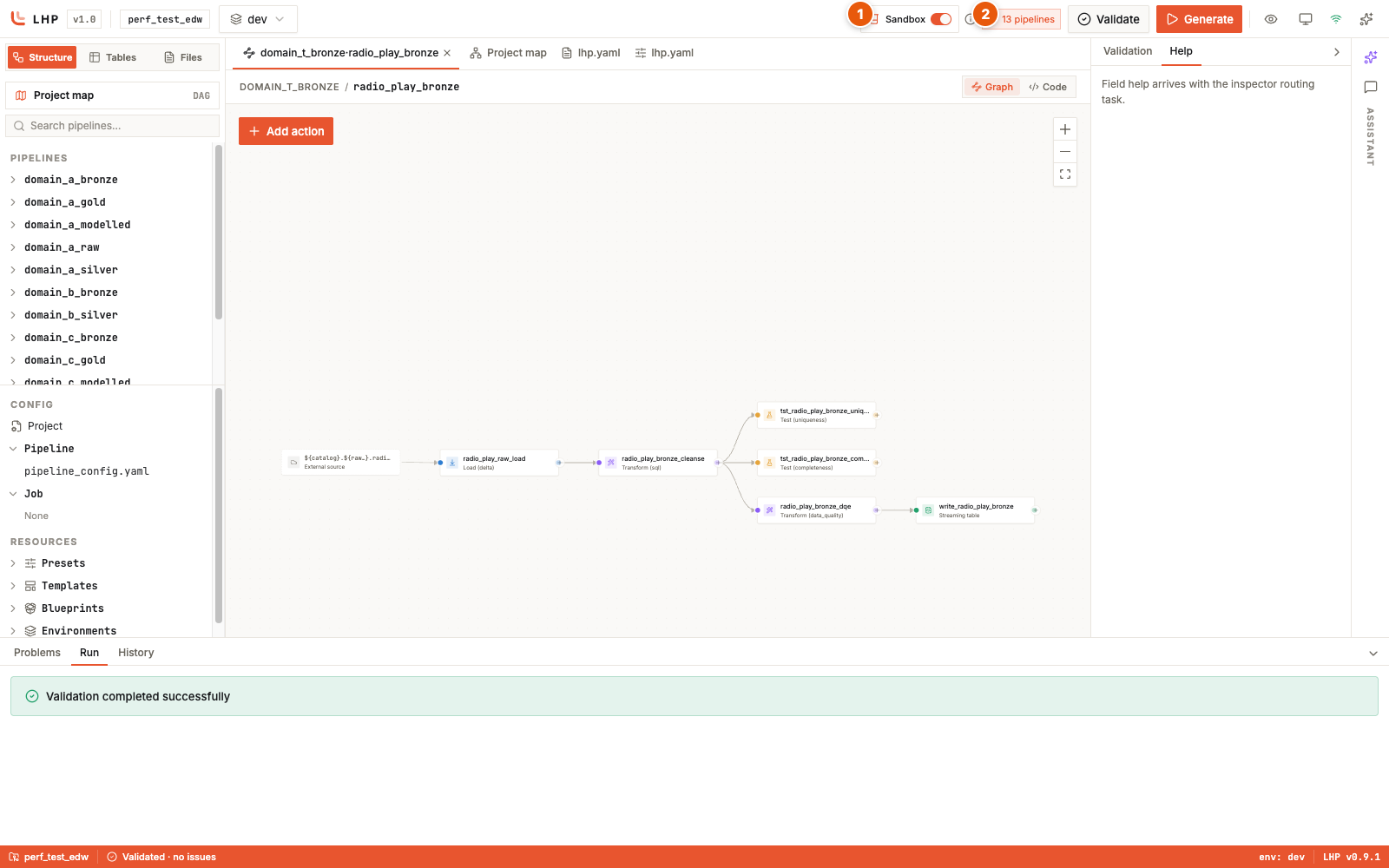
The Sandbox control in the lhp web header, switched on: ① the Sandbox
toggle, ② the scoped-pipeline count and its info button. With the toggle on,
every Validate and Generate run from the IDE is a sandbox run.
The clearest way to see the effect is the project map. With Sandbox off, the map draws the whole project — every pipeline and cross-pipeline edge, with a densely packed minimap in the corner:
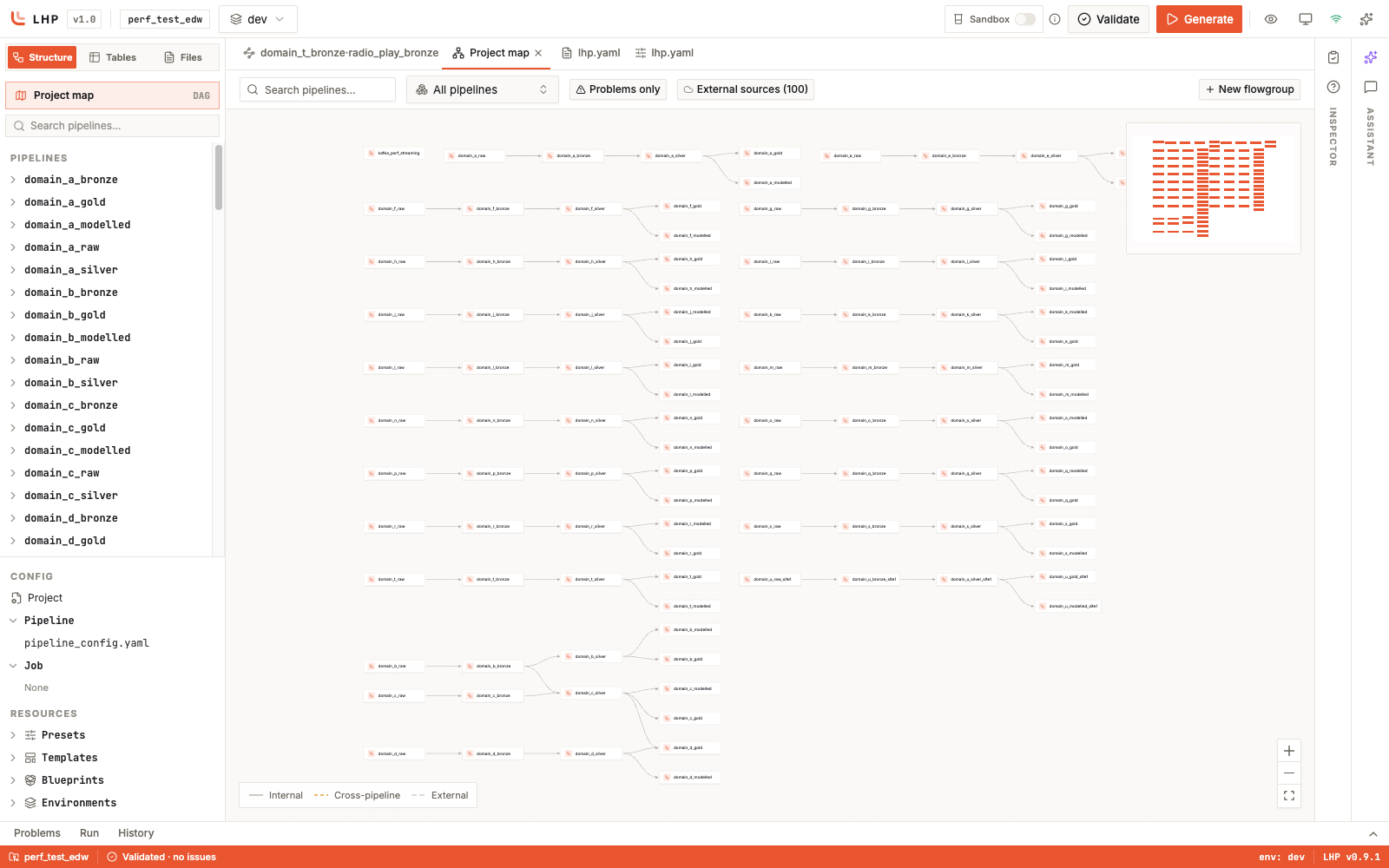
Sandbox off: the project map renders the full project — dozens of pipeline chains across every domain, with the header toggle grey and the minimap dense.
Turn Sandbox on and both the map and the explorer collapse to your slice —
the header gains a 13 pipelines scope badge and only the chains your profile
covers are drawn:
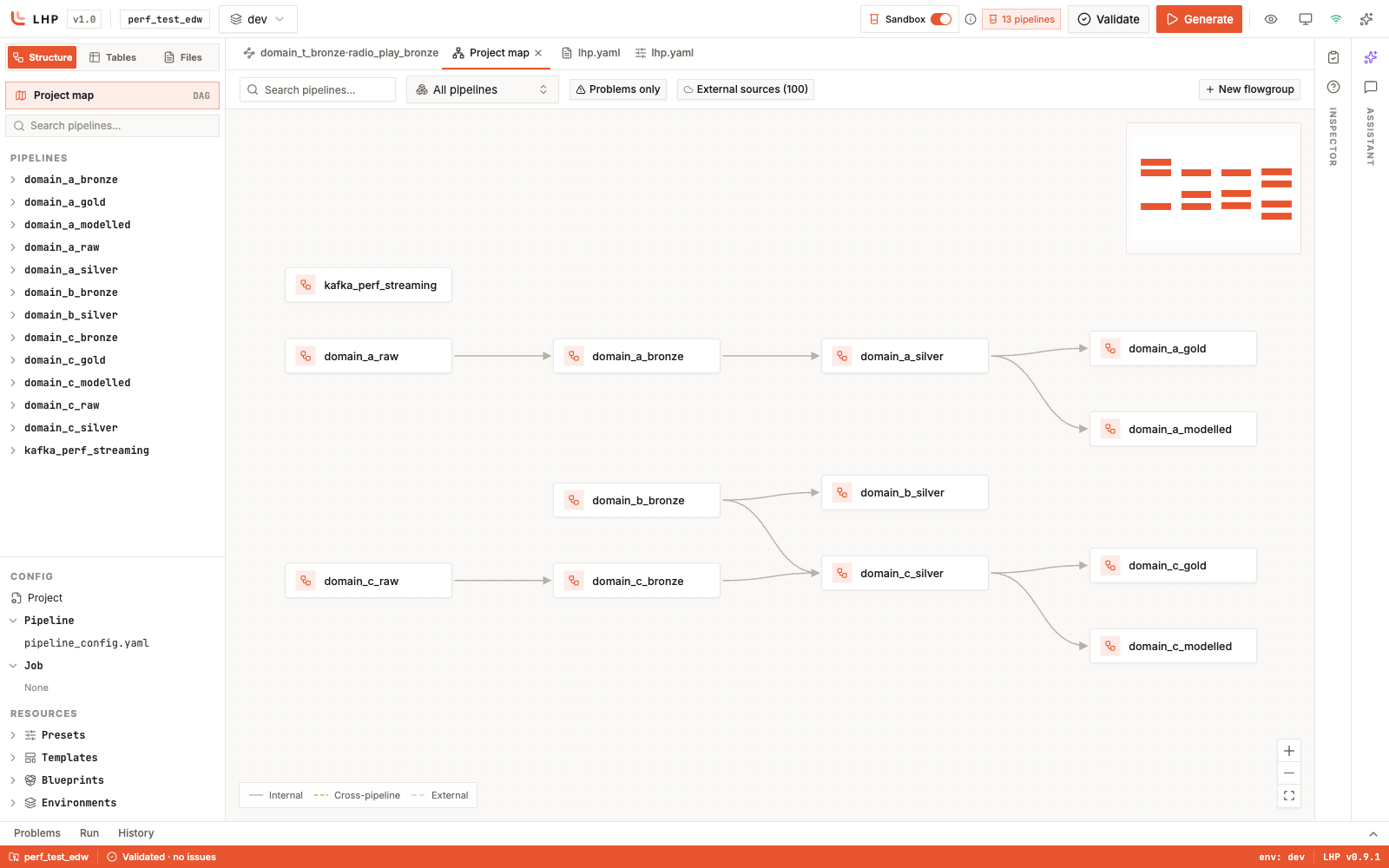
Sandbox on: the same map scoped to the profile — the header shows the
in-scope count (13 pipelines) and only the kafka_perf_streaming,
domain_a, domain_b, and domain_c chains remain, with a sparse
minimap.
You set that scope without leaving the browser. Click the 13 pipelines badge
to open the Sandbox scope dialog: set your namespace, tick the pipelines
you own, and add optional glob patterns. It writes the same gitignored
.lhp/profile.yaml the CLI reads, so a scope you set here also applies to
lhp generate --sandbox from the terminal — one profile, either entry point.
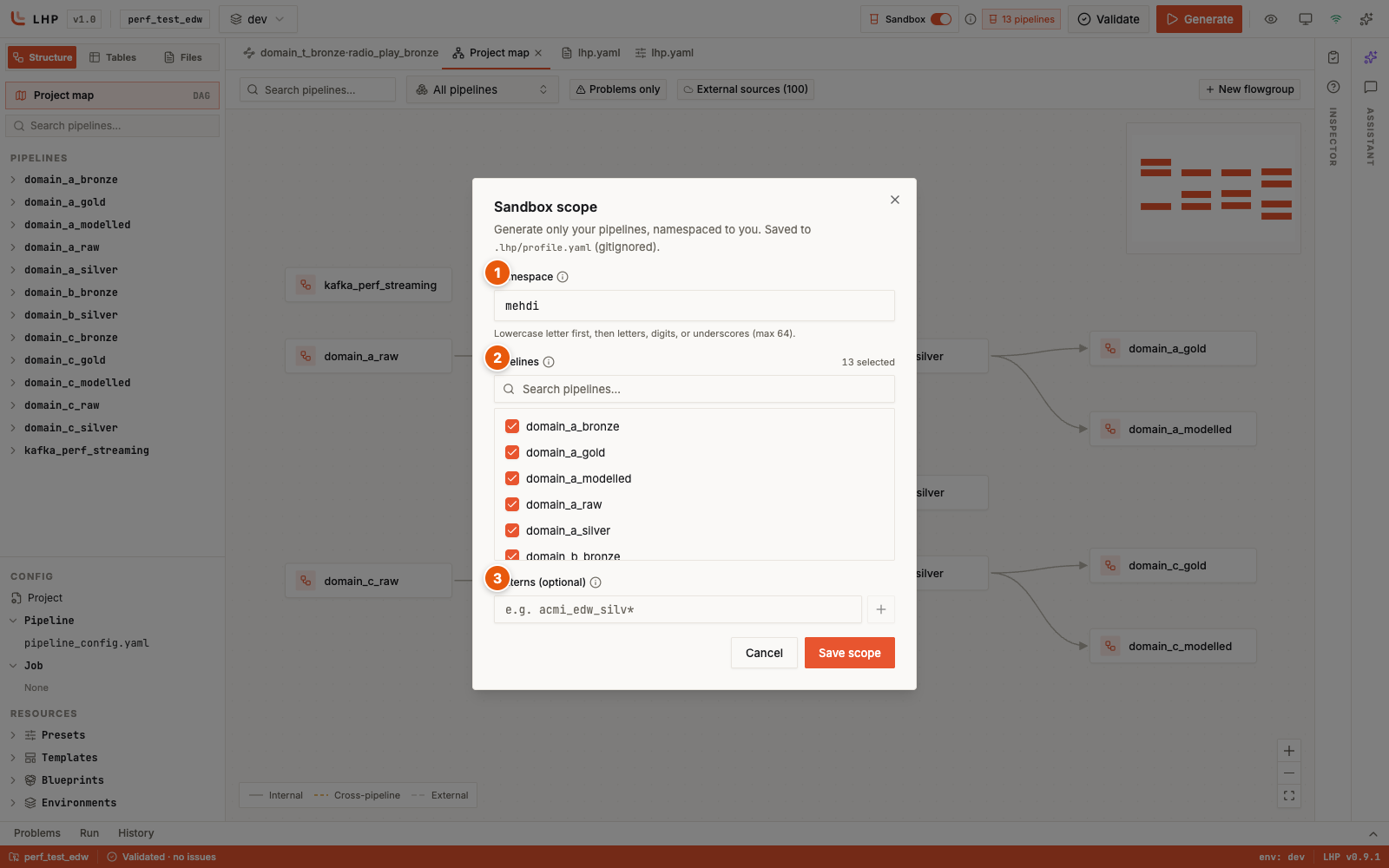
The Sandbox scope dialog, opened from the scope badge: ① the namespace,
② the pipeline selection (13 selected), ③ optional glob patterns. Saving
writes .lhp/profile.yaml.
Nothing else on this page changes with the toggle. The read-shared, write-own
rename rules, the .lhp/profile.yaml scope, the sandbox: policy in
lhp.yaml, and the databricks bundle deploy / destroy workflow all
apply identically whether you trigger the sandbox from the CLI flag or the
header switch. The toggle runs at the default warning level, the same as a plain
lhp generate --sandbox; to promote an in-scope read that could not be
rewritten (LHP-VAL-066, LHP-VAL-067) to a hard failure, run the CLI with
--strict, which has no switch equivalent in this build.
Where to go next
See every rename rule. Snapshot-CDC sources, delta sinks, test-action references, table names inside
spark.sqlbodies, and table references passed into custom Python all follow the read-shared, write-own rule with their own edge cases. The sandbox reference catalogs each site, the full configuration schema, and every sandbox error and warning code.Promote warnings to failures. Pass
--strictso a sandbox build with an in-scope read that could not be rewritten (LHP-VAL-066,LHP-VAL-067) fails instead of slipping through.Deploy the build. The deploy guide walks through packaging generated pipelines as a Databricks bundle and shipping them to a workspace.